

Support
Support designed to keep work moving
Support when and where you need it
Support for TankAware CMMS is designed to help users resolve questions efficiently, apply training consistently, and maintain accurate, defensible records.
This page outlines the available support resources and helps you choose the most effective starting point based on your needs.
In most cases, questions can be resolved by reviewing guidance and training materials. When issues cannot be resolved through those resources, troubleshooting tools and direct support are available.
Support options
Start with the resources that best match your needs
Use the tiles below to jump to detailed descriptions of each support option and the resources available. If you’re unsure where to begin:
Start with “Getting started” for how-to questions and feature guidance
Use “Training and implementation” for questions about how TankAware CMMS is used within your organization
Check “Troubleshooting” if something doesn’t look or behave as expected
“Contact support” when the issue appears technical, persistent, or time-sensitive
This approach helps resolve issues faster and ensures the right people are involved at the right time.
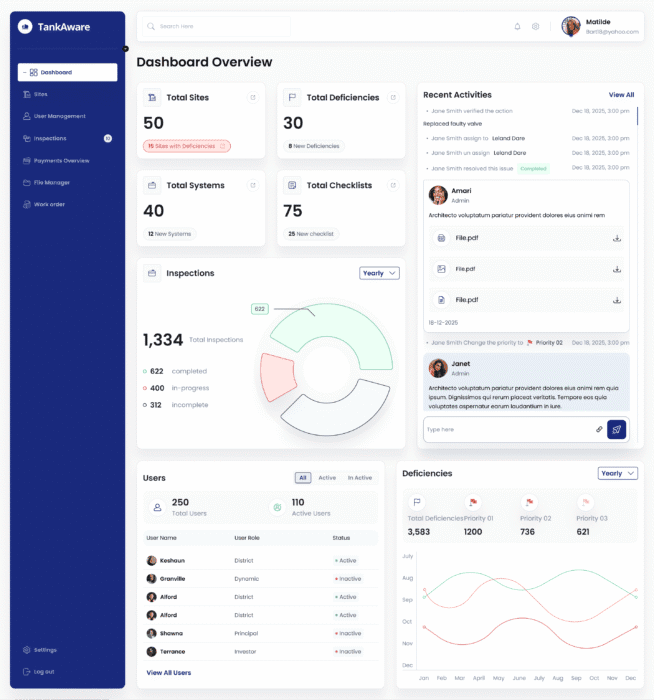
Getting started
Learn how to use TankAware CMMS in your role and complete common tasks correctly

Training and implementation
Understand how TankAware CMMS is rolled out in your organization and where to get process-specific guidance

Troubleshooting
Identify common issues, expected platform behavior, and next steps when something doesn’t work as expected in TankAware CMMS

Contact support
Get direct assistance from TankAware Support for TankAware CMMS technical or platform-related issues
Getting started
Guides and updates for everyday tasks
The “Getting started” resources are designed to help users confidently navigate TankAware CMMS and complete day-to-day tasks without needing additional support. Available resources include:
User guide
The TankAware CMMS User Guide (User guide) is the primary reference for understanding how to use the platform effectively and consistently. It provides step-by-step instructions, clear explanations of system features, and role-based guidance.
The User guide is structured so that users can quickly find what they need, with a clear table of contents, defined terminology, and task-based sections. Screenshots and examples are included to support visual learning and reduce ambiguity.
Whether you are introducing the platform for the first time, responding to a user question, or refreshing your knowledge, the User guide should be your first point of reference.
Updates and release notes
Updates and release notes provide a clear, transparent summary of improvements, enhancements, and fixes to TankAware CMMS. Each entry outlines release date, the type of update, what changed, and potential impact to users—helping operations teams, compliance officers, and administrators quickly understand what’s new and whether any action is required.
| Release date | Update type | Update title | Summary of change | Impact to users |
|---|---|---|---|---|
| Feb 10, 2026 | New feature | QR code integration for asset identification | Users can now scan or generate QR codes directly within TankAware CMMS to identify and access asset records, inspections, etc. | Improves field data access and reduces manual lookups for operators and inspectors working across multiple sites. |
| Jan 20, 2026 | Existing feature change | Improved deficiency tracking workflow | The deficiency tracking interface has been updated to support multi-step resolution workflows with clearer status indicators.. | Enhances visibility into deficiency resolution progress for compliance officers and operations managers. |
| Jan 10, 2026 | Bug fix | Report export date range correction | Resolved an issue where exported compliance reports occasionally excluded records from the selected date range. | Improves field data access and reduces manual lookups for operators and inspectors working across multiple sites. |
| Dec 15, 2025 | Maintenance or background update | Database performance optimization | Background improvements to query handling and indexing for organizations managing large volumes of inspection and maintenance. | Users may notice faster load times when accessing historical records and reports. |
Best for: How-to questions and understanding recent platform updates
Training and implementation
Applying TankAware within your organization
TankAware CMMS’ rollout and onboarding approach is supported by clear orientation, defined responsibilities, and practical materials that help organizations adopt the platform consistently and confidently.
Training and implementation resources explain how the platform is introduced and supported within your organization.
Rollout and onboarding orientation
Rollout and onboarding orientation for TankAware CMMS is designed to support consistent, confident platform adoption across organizations with regulated fuel storage operations.
Rather than relying on one-size-fits-all training, TankAware works with designated organizational leads to ensure the platform is introduced in a way that reflects real-world workflows, compliance responsibilities, and operational accountability.
During rollout, organizations receive structured orientation and implementation guidance that focuses on:
Understanding platform capabilities and intended use
Aligning TankAware CMMS workflows with internal policies and regulatory obligations
Establishing clear roles, responsibilities, and review processes
Supporting accurate, defensible recordkeeping from day one
Once onboarding is complete, users are supported through a combination of role-based guidance, internal orientation resources, and ongoing documentation. This approach ensures TankAware CMMS is not just implemented, but used consistently and correctly across sites, teams, and reporting periods.
TankAware’s rollout and onboarding model is designed to reduce disruption, support adoption at scale, and maintain compliance confidence as organizations transition to digital fuel storage management.
Instructions and materials
Instructions and supporting materials provide practical, task-level guidance for using TankAware CMMS in day-to-day operations. These materials are designed to reinforce correct platform use, clarify workflows, and support consistent recordkeeping over time.
Resources may include role-based guidance, workflow examples, and platform documentation that reflect current platform functionality. As TankAware CMMS evolves, reference materials are updated to help organizations maintain alignment with best practices and regulatory expectations.
Role and responsibility definitions
Clear role and responsibility definitions help ensure TankAware CMMS is used consistently across teams and sites. During rollout, organizations establish how different user roles interact with the platform, what actions they are responsible for, and how information is reviewed or approved.
This clarity supports accountability, reduces errors, and helps ensure inspections, maintenance activities, and compliance records are completed and managed appropriately within the organization.
TankAware CMMS orientation is designed to align with your organization’s operational processes, regulatory obligations, and internal policies.
Best for: Understanding how TankAware CMMS is used in your organization, reinforcing orientation concepts, and applying workflows consistently
Troubleshooting
When something doesn’t work as expected
If something doesn’t look or behave as expected in TankAware CMMS, troubleshooting resources can help you quickly determine whether the issue is related to setup, permissions, or normal platform behavior. Many common issues can be resolved by confirming a few details before additional support is needed.
User issues and quick checks
Helps resolve the most common TankAware CMMS user-reported issues by confirming setup, context, and access. Before contacting support, check the following:
You are logged into the correct site or facility, especially if your organization manages multiple locations
Your user role and permissions allow you to view or complete the task you’re attempting
Required fields or steps have been completed before saving or submitting a record
Filters, date ranges, or status views are not limiting what you see
Recent changes (such as role updates or site assignments) have fully taken effect
Many issues related to missing data, unavailable actions, or incomplete tasks can be resolved by verifying these details.
Platform behaviours
Some TankAware CMMS behaviors are intentional and help ensure data accuracy, audit readiness, and compliance. You may notice:
Status indicators that change only after required steps are completed
Records or reports that update after submission, approval, or synchronization
Restricted actions based on role, site assignment, or record status
Validation prompts that prevent incomplete or inconsistent data entry
Understanding expected platform behavior helps distinguish between true issues and features designed to protect data integrity.
Known issues and temporary workarounds
When known platform issues exist, they are documented here to help users stay productive while a resolution is in progress. This section may include:
A brief description of the issue and how it may affect workflow
The scope of impact (for example, specific features or user roles)
Temporary workarounds, if available
Status updates once the issue has been resolved
| Date reported | Issue type | Issue title | Summary of issue | Impact to users |
|---|---|---|---|---|
| Feb 10, 2026 | Data visibility and accuracy | Delayed sync for inspection records across multi-site views | Inspection records submitted from field devices at sites with limited connectivity may take up to 15 minutes to appear in the centralized dashboard. | Compliance officers reviewing cross-site inspection status may see temporarily incomplete data. |
| Jan 20, 2026 | Workflow or process issues | Deficiency reassignment notification not triggering | When a deficiency record is reassigned to a different user, the new assignee does not receive an in-platform notification. | Users reassigned to deficiency follow-ups may not be immediately aware of the assignment within the platform. |
| Jan 10, 2026 | Performance and availability | Slower report generation for large date ranges | Compliance and maintenance reports generated for date ranges exceeding 12 months are experiencing longer-than-expected processing. | Report exports may take 30-60 seconds longer than usual. Workaround: generate reports for shorter date ranges as needed. |
Best for: Unexpected behavior, missing data, access confusion, or task completion issues
Contact support
Direct assistance for platform-level issues
If a TankAware CMMS issue cannot be resolved through guidance, training, or troubleshooting, TankAware Support is available to help.
Contact support for:
Technical platform issues or suspected defects
Access or permission problems
Performance or reliability concerns
Issues that may impact compliance or reporting
Recent changes (such as role updates or site assignments) have fully taken effect
Before contacting support, it’s helpful to gather:
A description of what you were trying to do
What happened instead
Screenshots or error messages, if available
Support inquiries are reviewed during standard business hours, Monday–Friday, 8:00 am to 5:00 pm Atlantic Standard Time (AST). Support inquiries received outside business hours will be responded to on the next business day.
Live chat
Live chat is available for questions and general guidance while you’re using TankAware CMMS.
Email support
Email support is available for follow-up questions or sharing additional information related to an existing support request.
Telephone support
Telephone support is available for urgent platform issues during business hours. Calls may be logged and followed up through a support request.
Submit support request
For technical issues, access problems, or anything that may affect compliance or reporting, submit a support request.
"*" indicates required fields
Support
Support you can rely on
TankAware’s Support resources are continuously improved based on user feedback, platform updates, and real-world operational needs. Documentation, training guidance, and troubleshooting content evolve alongside the TankAware CMMS platform.
We encourage users to treat this Support page as an ongoing reference—whether you’re onboarding, refreshing your knowledge, or resolving an issue.
Blog
Latest insights and best practices

Environmental compliance and regulation
Understanding environmental compliance regulations
Stay up-to-date with the latest regulatory requirements affecting fuel storage operations.

ESG and sustainability
The latest tutorials & product news
Gravida neque aliquam montes, eu congue purus senectus risus.
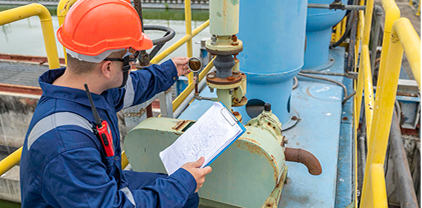
Maintenance and inspection best practices
See what’s coming next at WP Vantage
Essential inspection protocols to maintain compliance and prevent environmental incidents.
Related information
Case studies and success stories
Discover how organizations use TankAware CMMS
Insights and best practices
Explore compliance and maintenance resources
TankAware CMMS User Guide
Consult instructions, system feature explanations, and role-based guidance
About TankAware
View information about TankAware
Get started
Transform your compliance operations
Discover why TankAware CMMS helps teams stay audit-ready and operate with confidence.